
Buy CRNC Guide
CRNC can be accessed directly through MetaMask.
No separate exchange account is required for this method.
The basic flow is simple: add ETH to MetaMask, open the swap screen, paste the CRNC token address, then confirm the transaction.
Important: Cryptocurrency transactions can involve volatility, network fees, slippage, and irreversible actions. Never share your Secret Recovery Phrase with anyone.
Always verify that the token address matches exactly before swapping.
Step-by-Step Guide
Install MetaMask
Install the MetaMask app or browser extension from the official MetaMask website:
Additional MetaMask getting-started information can be found here:
https://support.metamask.io/start/getting-started-with-metamask/
Create a Wallet
Open MetaMask and follow the prompts to create a wallet.
During setup you will receive a Secret Recovery Phrase. Write it down, store it somewhere safe, and never share it with anyone.
Anyone with this phrase can access your wallet.
Add Ethereum (ETH)
After your wallet is created, add funds by purchasing Ethereum (ETH) directly inside MetaMask.
MetaMask provides a Buy option that connects to payment providers, allowing purchases using debit card, credit card, or bank transfer depending on your location.
When purchasing, make sure:
- The asset selected is Ethereum (ETH)
- The network selected is Ethereum
More information about buying crypto in MetaMask can be found here:
https://support.metamask.io/manage-crypto/move-crypto/buy/how-to-buy-crypto-in-metamask/
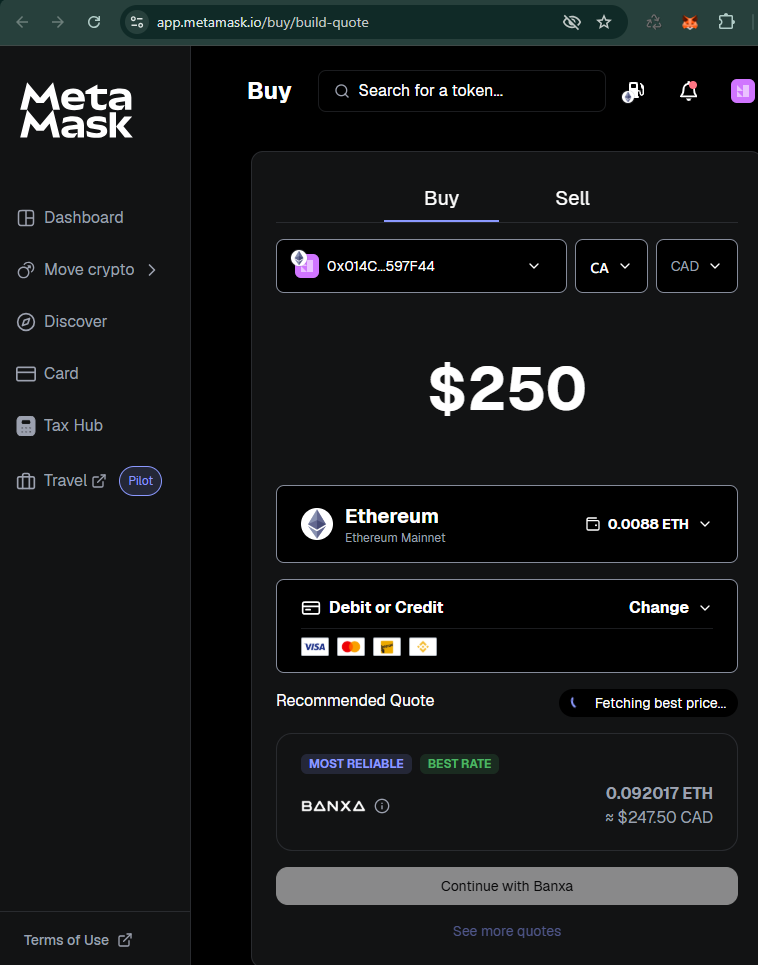
Example: Buying Ethereum (ETH) inside MetaMask. Ensure Ethereum and Ethereum Mainnet are selected.
Confirm Your ETH Balance
Wait until your ETH balance appears in MetaMask.
Do not continue until the ETH is visible in your wallet.
Open the Swap Screen in MetaMask
Inside MetaMask, tap Swap.
Choose ETH as the asset you want to swap from.
Paste the CRNC Token Address
In the “to” field, paste the CRNC token address:
MetaMask should identify the token as CRNC.
Always confirm the address carefully before proceeding.
Enter the Amount
Enter the amount of ETH you would like to swap for CRNC.
If this is your first crypto transaction, many users prefer starting with a smaller amount first.
Review the Transaction
Before confirming, review:
- Estimated CRNC received
- Ethereum network fee
- Price impact or slippage
Leave a small amount of ETH in your wallet for Ethereum network fees.
Confirm the Swap
Tap Swap, then confirm the transaction in MetaMask.
Once the transaction is confirmed on Ethereum, the CRNC tokens should appear in your wallet.
Important Notes
- Cryptocurrency transactions are generally irreversible once confirmed.
- Always verify the correct token contract address before swapping.
- Never share your Secret Recovery Phrase with anyone.
- Keep some ETH in your wallet for Ethereum network fees.
Quick Summary
MetaMask → Add ETH → Tap Swap → Paste CRNC token address → Confirm